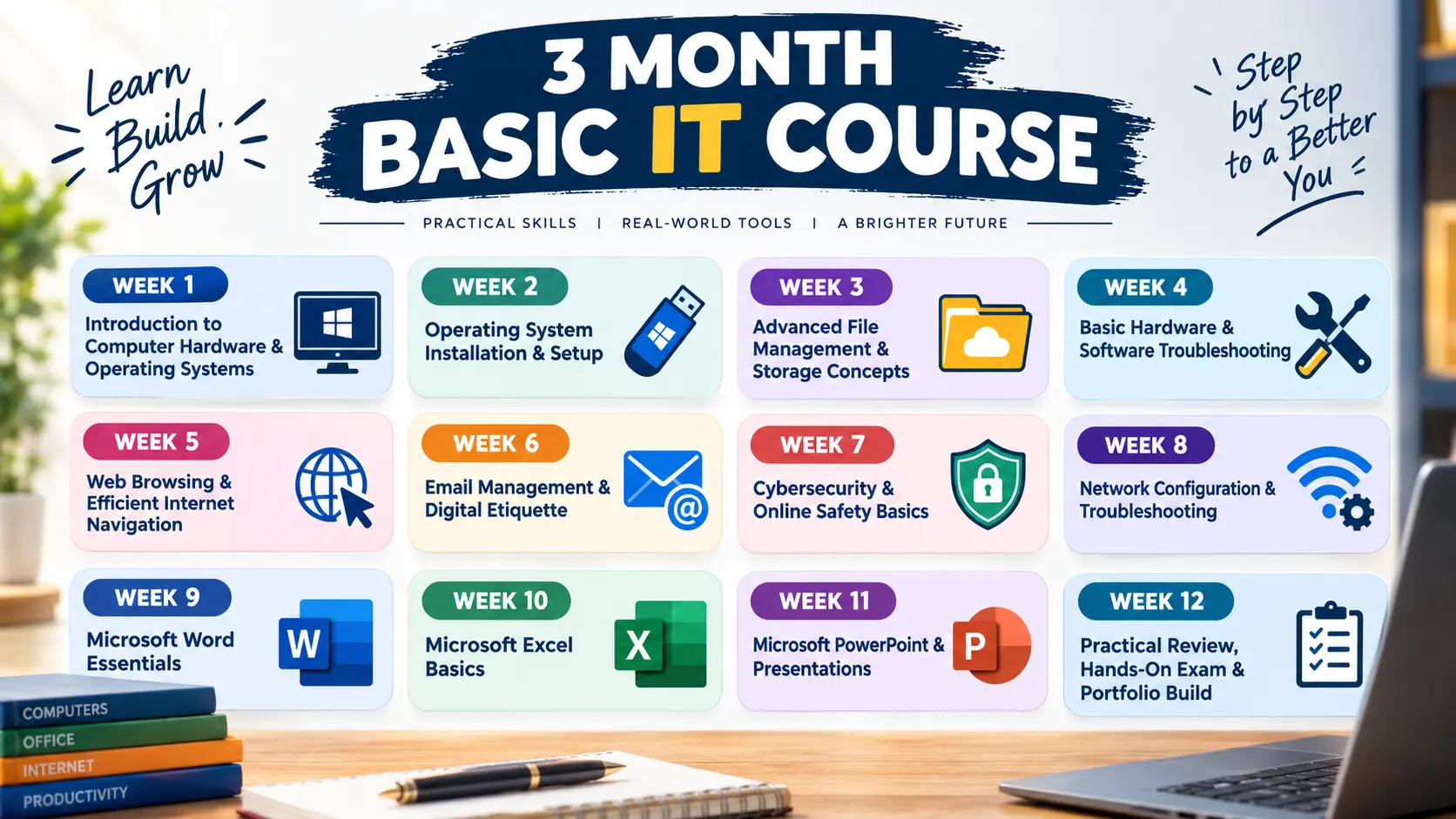
Week 1: Introduction to Computer Hardware & Operating Systems
Understanding system components: CPU, RAM, Storage (HDD vs. SSD), I/O devices.Navigating the Windows environment (Taskbar, Start Menu, System Settings, Action Center).Basic computer maintenance (updates, restarting, cable management).
Week 2: Operating System Installation & Setup
Preparing bootable USB drives (using media creation tools/Rufus).Step-by-step Windows installation process, BIOS/UEFI boot priority settings.Initial OS setup, user accounts, privacy settings, and driver updates.
Week 3: Advanced File Management & Storage Concepts
Drive partitioning, directory trees, file paths, and folder structures.File types and extensions (.pdf, .docx, .xlsx, .png, .zip).Compression tools (WinRAR/Zip), file permissions, and cloud storage basics (Google Drive/OneDrive).
Week 4: Basic Hardware & Software Troubleshooting
Common Windows errors and blue screens (BSOD).Using Windows Task Manager, Device Manager, and Resource Monitor.Peripheral troubleshooting (printers, sound, external drives, display connections).Internet Navigation, Security & Professional Email Handling
Week 5: Computer Networking Essentials
Introduction to networks (LAN, WAN, Wi-Fi).IP addressing, DNS, and basic networking hardware (Routers, Switches, Modems).Network troubleshooting and connection setup.
Week 6: Web Browsing, Internet Safety & Digital Literacy
Effective web search techniques and critical evaluation of online sources.Cybersecurity basics: Phishing, malware, passwords, and two-factor authentication (2FA).Browser security features and safe downloading practices.
Week 7: Office Productivity Suite - Word Processing
Creating, editing, and formatting documents.Working with tables, images, headers/footers, and page layouts.Collaboration, comments, and exporting documents.
Week 8: Spreadsheets & Data Handling
Introduction to spreadsheets: cells, formulas, and functions.Data organization, sorting, filtering, and conditional formatting.Creating charts, graphs, and basic data visualization.
Week 9: Presentation Tools & Visual Communication
Designing engaging slide presentations.Adding multimedia, animations, and transitions.Best practices for public speaking and visual delivery.
Week 10: Cloud Computing & Online Collaboration
Using cloud platforms (Google Workspace, Microsoft 365).Real-time document sharing and team collaboration.Cloud storage management and synchronization.
Week 11: IT Security, Privacy & Data Protection
Data backup strategies and disaster recovery concepts.Understanding privacy policy, digital footprint, and ethics in IT.System security best practices and software patching.
Week 12: Practical Review & Final Assessment
Comprehensive review of hardware, OS, networking, and software skills.Hands-on practical assessment and troubleshooting scenarios.Course completion wrap-up and career path guidance.